How to Fix Holmes Tower Fan Not Working
Is your Holmes tower fan not working? You are not alone. Thousands of users face the same frustration: pressing the power button only to hear a faint hum with no airflow, dealing with strange grinding noises, or finding the remote completely unresponsive. The good news: most Holmes tower fan issues are fixable at home with basic tools and a little know-how. Whether it is a failed capacitor, seized bearings, or a dead remote, this guide will walk you through diagnosing and repairing every common failure mode, saving you the cost of replacement.
By the end of this guide, you will know how to safely open your fan, test critical components, clean and lubricate internal parts, and restore full operation, often in under an hour. Let us get your fan blowing again.
Diagnose Why Your Holmes Tower Fan Is Not Working
Before disassembling your fan, identify the specific symptom. The repair path depends entirely on what your fan is or is not doing. Understanding the exact failure mode will save time and prevent unnecessary parts purchases.
Fan Humming But Not Spinning
If your Holmes tower fan powers on, lights up, beeps, and oscillates, but the blades do not turn, the issue is mechanical or electrical startup failure. This is the most common malfunction and usually points to one of three culprits: a blown start capacitor, dry solder joints, or seized bearings.
A multimeter test on affected units shows abnormal current. Only one wire carries power when on, but all six motor wires show voltage when off. This confirms the motor is not receiving proper startup current.
Likely causes include:
• Failed start/run capacitor (most common)
• Dry or cracked solder joints on motor leads
• Seized motor shaft or pivot points
• Safety switch not engaged (filter or back cover loose)
Grinding, Squeaking, or Clicking Noises
Unusual sounds mean mechanical resistance. Over time, internal grease hardens into a thick, gritty paste, especially in units over five years old. This causes friction, noise, and eventually motor strain.
Common sources include:
• Degraded bearing grease
• Warped or loose blades
• Bent motor shaft
• Dust-packed housing
• Loose internal screws
Remote Control Not Responding
If the fan works manually but ignores the remote, the problem is isolated to the IR system. This is rarely the fan’s main motor or power supply.
Check these items:
• Dead or corroded remote batteries
• Worn-out remote buttons (especially ON/OFF)
• Dirty or blocked IR receiver lens
• Loose wiring on receiver module
• Need for remote re-pairing
Fan Won not Turn On at All
No lights, no sound, complete power failure. This suggests a deeper electrical issue.
Possible causes include:
• Damaged power cord
• Blown internal fuse
• Failed control board
• Total motor burnout (rare)
Fix a Humming but Not Spinning Holmes Tower Fan
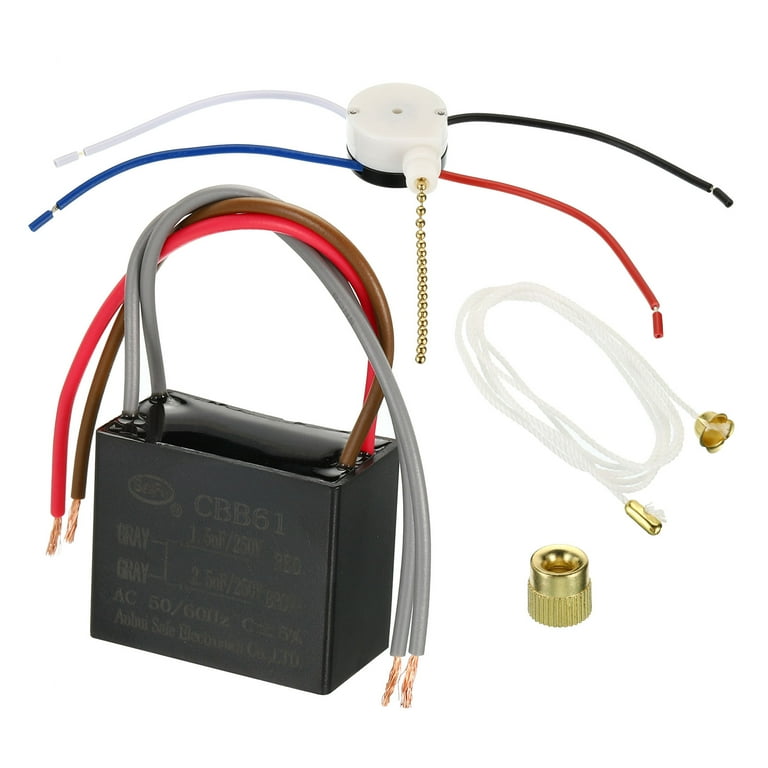
When the motor hums but the blades stay still, it lacks starting torque. The fix usually lies in the capacitor or connections. This is the most frequent repair scenario for Holmes tower fans not working.
Replace the Start Capacitor
The CBB61 2.5uF 250VAC capacitor is the most common failure point. It delivers the initial jolt needed to spin the motor. When it fails, the motor hums but cannot overcome static friction.
Tools needed:
• Phillips #00 screwdriver
• Multimeter with capacitance mode (or ESR meter)
• Replacement capacitor (CBB61 2.5uF 250VAC, approximately $3)
Steps to replace the capacitor:
1. Unplug the fan. Never work on live electronics.
2. Remove the base or rear panel to access the motor and control board.
3. Locate the capacitor, a small silver cylinder near the motor terminals.
4. Inspect for burn marks or bulging. If visible damage, replace immediately.
5. Test with multimeter. Disconnect leads and set meter to capacitance. A reading of “1” or “OL” means it is dead.
6. Cut old leads close to the board.
7. Solder new capacitor to the existing wires. Use enough heat and solder to ensure a solid, shiny joint. Avoid cold or dry joints.
8. Reassemble and test. The fan should now start smoothly.
Pro Tip: If you do not have a multimeter, replacing the capacitor is still the fastest diagnostic step. It is cheap and fails often.
Repair Dry Solder Joints
Even with a good capacitor, poor solder connections can block power. Dry joints appear dull, cracked, or raised, like a tiny volcano.
How to fix dry joints:
1. Inspect motor terminals and capacitor leads.
2. Reflow solder with a soldering iron. Apply heat and a small amount of fresh solder to each joint until it flows smoothly.
3. Check continuity with a multimeter if possible.
4. Test fan operation.
This takes 10 minutes and costs nothing, but can revive a dead motor.
Silence Noisy or Seized Holmes Tower Fans

Grinding or squeaking? Your fan’s internal grease has turned to sludge. Cleaning and lubrication will restore quiet operation. Many owners report their Holmes tower fans not working due to this exact issue.
Deep Clean the Motor and Housing
Contrary to warnings, hosing down non-functional units has proven effective in real-world repairs, especially for old models clogged with years of grease and dust.
Steps for deep cleaning:
1. Disassemble completely. Remove casing, blades, motor housing, and internal frame.
2. Keep electronics dry. Protect the control board, wiring, and switches with a plastic bag or work on them separately.
3. Wash non-electrical parts. Use a hose and brush to scrub the motor housing, shaft, and bearings. Remove all black, hardened grease.
4. Dry thoroughly. Place parts in direct sun or a warm room (80°F or higher) for two to three days. Moisture is the enemy. Never rush this step.
User Verified: Multiple long-term Holmes owners report full restoration after complete washing and drying.
Lubricate Pivot Points
Once dry, apply lubricant to key moving parts.
Lubrication points include:
• Top spindle (where shaft enters upper housing)
• Bottom pivot (motor shaft base)
• Internal bearing race
Use silicone-based lubricant (preferred, does not attract dust) or WD-40 with straw (effective for penetrating seized pivots, wipe excess).
Apply lubricant:
1. Spray or drip a small amount into each pivot.
2. Rotate the shaft by hand to distribute.
3. Let sit 10 minutes before reassembly.
Warning: Too much oil attracts dust and creates new buildup. Less is more.
Rebalance and Reassemble Blades
Misaligned blades cause vibration and noise.
Check these items:
• Are blades bent or cracked?
• Are they securely fastened to the hub?
• Does the assembly spin freely by hand?
Fix any issues:
• Replace damaged blades.
• Tighten set screws.
• Ensure even spacing around the housing.
Restore Remote Control Function on Your Holmes Tower Fan
If the fan works manually but the remote is dead, follow this troubleshooting flow. Many users find their Holmes tower fan not working simply due to remote issues.
Test the Remote Signal
Use your phone’s camera to see IR light.
Steps to test the remote:
1. Point remote at phone camera.
2. Press any button.
3. Look for a flickering white or purple light on screen.
If no light appears, the remote is not transmitting. This means dead batteries or failed contacts. If light appears, the signal is sending, and the problem is on the fan side.
Fix Battery and Contact Issues
Corrosion and weak springs kill remotes.
Do this:
1. Replace batteries with fresh ones, correct polarity.
2. Clean terminals with cotton swab and isopropyl alcohol.
3. Inspect rubber contacts under buttons. Clean with alcohol if oxidized.
4. Press firmly. Worn button pads may need harder input.
Repair the Fan IR Receiver
The receiver module is inside the fan housing.
Check these items:
1. Open fan casing.
2. Locate receiver (small PCB near front).
3. Inspect wires. Reseat any loose connections.
4. Clean sensor lens with dry cloth. Dust blocks signals.
Re-Pair the Remote
Some Holmes models require pairing after battery replacement.
Typical pairing method:
1. Hold pairing button on receiver (inside fan) for 5 to 10 seconds.
2. Press any button on remote.
3. Listen for beep or check for light confirmation.
If no pairing button exists, consult manual or try a universal remote (2.4 GHz or 433 MHz).
Prevent Future Failures on Your Holmes Tower Fan
A repaired fan can last years if maintained. Regular care prevents your Holmes tower fan from not working again.
Clean Filters Monthly
Dust-clogged filters reduce airflow and strain the motor.
Action to take:
• Remove filter (if equipped).
• Rinse with water, dry completely.
• Reinstall.
Lubricate Annually
Prevent grease hardening.
Do this annually:
• Apply one to two drops of silicone lubricant to pivot points.
• Spin shaft by hand to distribute.
Store Properly
If storing the fan:
• Clean and dry thoroughly.
• Cover to prevent dust buildup.
• Avoid damp areas.
When to Replace vs. Repair Your Holmes Tower Fan
A new Holmes tower fan costs around $50. Repair costs are usually under $10, just a capacitor and lubricant.
Repair if:
• Fan is less than 10 years old
• Motor hums or makes noise
• Only remote or capacitor failed
Replace if:
• Motor is burnt out (burning smell, no hum)
• Control board is cracked or charred
• Fan is over 15 years old with multiple issues
Real Data: Users report Holmes fans lasting 14 or more years with basic maintenance. Repair is almost always worth it.
Frequently Asked Questions About Holmes Tower Fan Not Working
Why does my Holmes tower fan hum but not spin?
This indicates a failed start capacitor or dry solder joints. The motor receives power but lacks the initial torque to overcome static friction. Replace the CBB61 2.5uF 250VAC capacitor to resolve this issue.
Can I wash my Holmes tower fan with water?
Yes, but only the non-electrical parts. Remove all electronics first, hose down the motor housing and blades, then dry completely for two to three days before reassembly. Moisture inside electronics will cause short circuits.
How do I know if my remote is working?
Point the remote at your phone camera and press any button. If you see a flickering light on the screen, the remote is transmitting. No light means dead batteries or failed internal components.
What is the most common part that fails on Holmes tower fans?
The start capacitor (CBB61 2.5uF 250VAC) fails most frequently. It is inexpensive and relatively easy to replace. This is the first component to check when your Holmes tower fan is not working.
How long do Holmes tower fans typically last?
With proper maintenance, Holmes tower fans can last 14 years or more. Regular cleaning and annual lubrication of pivot points significantly extend the operational life.
Why is my Holmes tower fan making grinding noises?
Grinding noises indicate degraded bearing grease that has hardened into sludge. Disassemble the fan, clean all grease and dust from the motor housing and bearings, then apply fresh silicone lubricant to restore quiet operation.
Key Takeaways for Fixing Your Holmes Tower Fan

A Holmes tower fan not working does not mean it is dead. In most cases, a failed capacitor, dried grease, or remote issue is to blame, and all are fixable. With a screwdriver, multimeter, and $3 capacitor, you can restore full function in under an hour. The most common repair involves replacing the CBB61 2.5uF 250VAC start capacitor, which provides the initial torque the motor needs to spin. For noisy fans, deep cleaning and lubrication of pivot points will silence grinding and squeaking. Regular cleaning and annual lubrication will extend your fan’s life for many years. Do not toss it. Fix it. Your wallet and the planet will thank you.