Fix Dyson Tower Fan Noise Issue
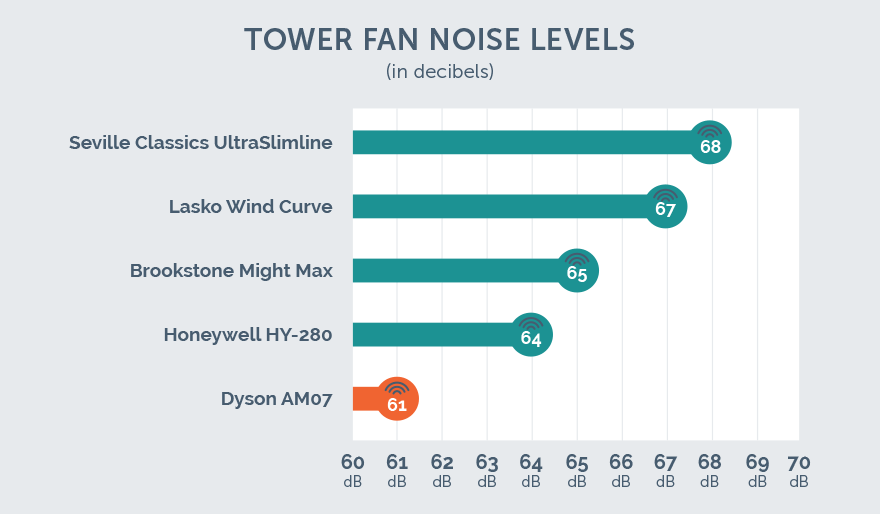
Dyson tower fans are engineered for quiet, powerful airflow—so when unexpected dyson tower fan noise starts disrupting your bedroom or office, it is not just annoying, it defeats the product is core promise. While these fans typically operate between 38 dB at low speed and 62 dBA at max, any sudden whirring, clicking, or rattling is not normal. Fortunately, most noise issues stem from fixable causes like dust buildup, loose parts, or mechanical friction, not permanent failure.
This guide cuts through the confusion with a clear, step by step approach to diagnosing and silencing your noisy Dyson fan. Whether you are hearing a rhythmic click during oscillation or a persistent whine at low settings, we will help you identify the root cause using real world sound profiles, user tested repair protocols, and insider maintenance tips.
Decode Your Fan is Noise Type

Identifying the exact sound your Dyson makes is the first step to fixing it. Not all noise is equal, each type points to a different internal issue. Match your symptom to the descriptions below before proceeding.
Whirring at Low Speeds
A loud whirring noise at low speeds is not normal and usually develops over time. This is not the expected airflow hum, it is a mechanical grind caused by restricted movement or friction. Common causes include dust packed filters reducing airflow, debris wrapped around internal fan blades, dried out motor bearings increasing resistance, and clogged air channels forcing the motor to work harder.
Pro Tip: If the noise is worse at low speeds but smooths out at high, it is likely a motor or balance issue, not just airflow.
Clicking During Oscillation
A rhythmic clicking or clanking that syncs with head rotation points to oscillation mechanics. This noise only happens when the fan moves side to side and often worsens over time. Likely culprits include internal power cable rubbing against housing, binding due to a crooked metal shaft, loose internal components shifting with motion, and normal mechanical tolerance at rotation endpoints.
Warning: A soft click at the far left or right edge is usually harmless. But loud, repetitive clicking mid sweep needs attention.
General Rattling On Off Oscillation
Random, irregular rattling, even when the fan is not oscillating, means something inside is loose. Unlike oscillation specific noise, this occurs constantly and may vibrate the entire unit. The primary cause is the internal black motor component has loose screws, allowing it to float and strike the housing. This part is secured by four screws that can loosen over time from vibration.
Deep Clean for Whirring Noise

If your Dyson emits a constant whirring or grinding sound, especially at low speeds, a deep clean is your best fix. Dust buildup restricts airflow, forces the motor to strain, and amplifies noise. This process targets the AM07, TP04, and similar models.
Remove Base and Covers
- Unplug the fan to ensure safety.
- Twist the base counterclockwise slightly and lift it off.
- Locate the side cover screw (Torx T8) and remove it.
- Use a plastic pry tool to gently lift the cover, then remove four additional Torx T8 screws around the rim.
- Lift the outer casing to expose the internal housing.
Visual Cue: Heavy dust accumulation inside is normal after six or more months of use.
Clean Hidden Filter and Blades
- Vacuum all surfaces, especially the motor housing and air channels.
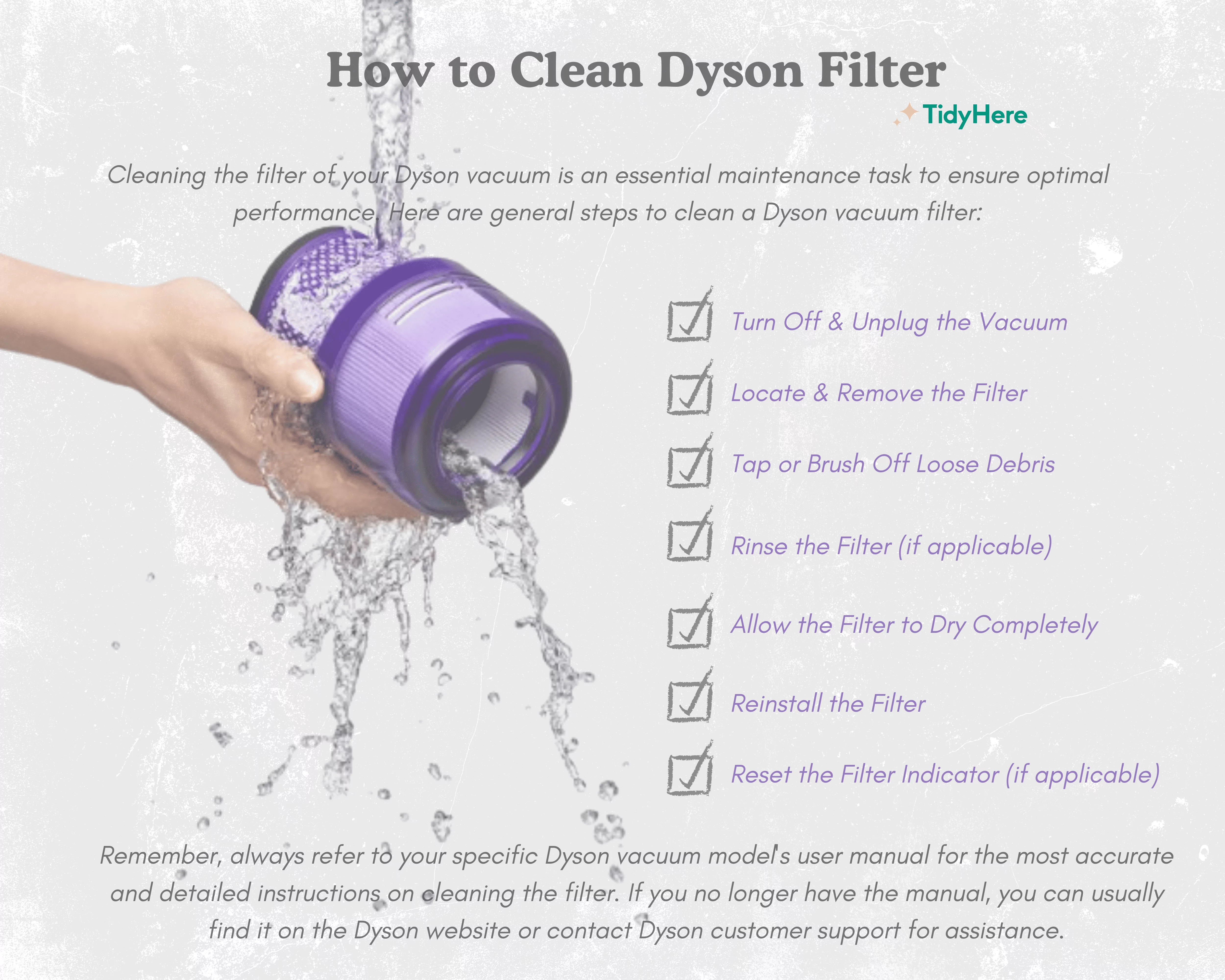
- Pull out the hidden foam filter from the base. It is often clogged with pet hair and dust.
- Rinse the filter under running water if approved for your model. Dry completely for 24 hours before reinstalling.
- Use a toothbrush or small tool to dislodge debris from fan blades and crevices.
Critical Warning: Do not remove the foam pad beneath the motor. It dampens vibration and reduces noise.
Lubricate Motor Shaft
A dry motor bearing causes grinding and whirring.
- Locate the small screw on the motor backplate that covers the bearing access.
- Remove the screw and apply one drop of synthetic grease (e.g., Super Lube).
- Rotate the motor shaft by hand to work in the lubricant.
- Wipe away any expelled grime or old oil.
Time Estimate: 10 to 15 minutes. Reassemble in reverse order, ensuring wires are routed correctly.
Test Result: Noise should drop significantly at low speeds within 20 minutes of operation.
Silence Oscillation Clicks and Squeaks
Oscillation noise is common but fixable. The solution depends on whether it is friction based or mechanical.
Perform Manual Reset
For minor squeaking or sticking:
- Power off the fan.
- Hold the base firmly and manually rotate the head left and right.
- Move it through the full arc several times.
This often realigns internal parts and stops the noise immediately, no tools required.
Difficulty: Very Low. Time: Under one minute.
Lubricate Internal Oscillation Cable
If clicking persists, the internal power cable may be rubbing.
- Remove the bottom center screw (Torx T20) to access lower housing.
- Gently pull apart the base to expose the cable routing.
- Apply silicone spray or gel to the cable where it bends during rotation.
- Reassemble and test oscillation.
Why Silicone? It will not attract dust like oil based lubes.
Pro Tip: Avoid over lubricating. Excess can drip and damage electronics.
Shim a Crooked Metal Shaft
If the fan binds or clanks at one end, the shaft may be misaligned from the factory.
- Fully disassemble the fan to access the shaft affixing plate.
- Inspect for uneven gaps or worn paint on the filter basket.
- Place a small washer under one screw on the plate to tilt and realign the shaft.
- Reassemble and test rotation.
Difficulty: High. Time: 30 to 45 minutes.
Expert Note: This fix corrects manufacturing defects. If under warranty, contact Dyson first.
Stop General Rattling Noise
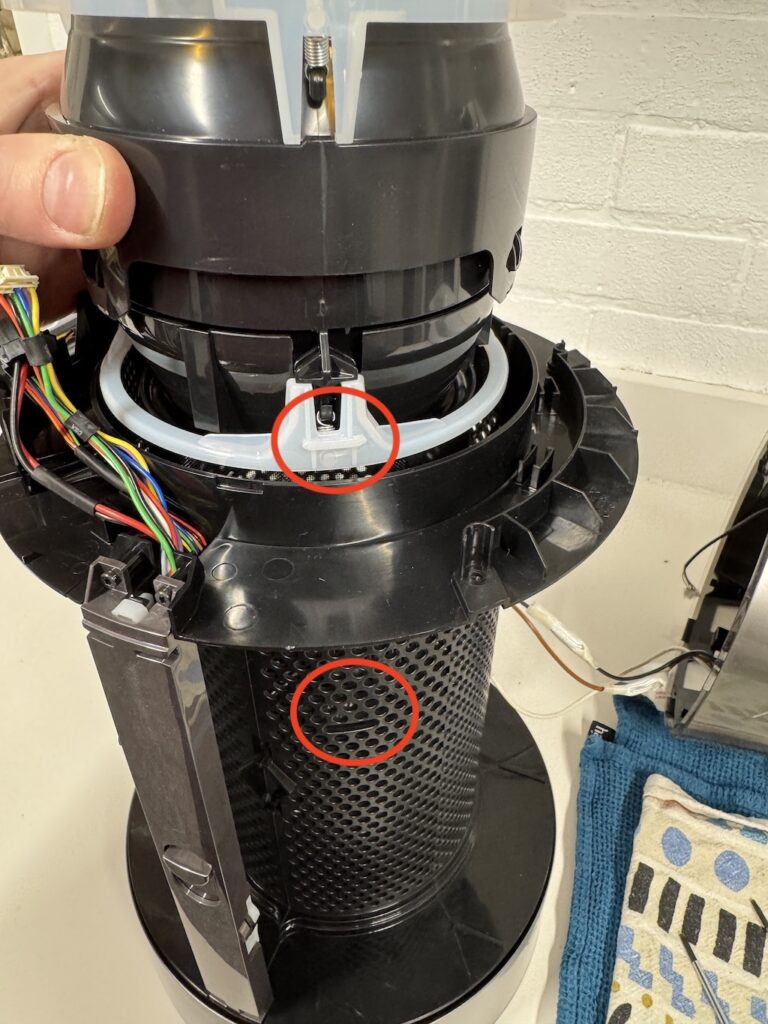
A loose internal component is the usual culprit behind constant rattling. This fix is quick and effective.
Access the Fan Head
- Unplug the fan.
- Press the small plastic tab on the side of the head and lift to release.
- Remove the star head screw underneath.
- Turn the head counterclockwise and pull straight out.
Secure the Black Internal Component
- Disconnect the wire harness by pressing the black connector away from the socket.
- Locate the four screws holding the black motor part.
- Tighten all four screws firmly. This pulls the component upward, increasing clearance from the housing.
- Test by gently pushing and spinning the part. It should move silently.
Reassemble and Test
- Reconnect the wiring and clip it securely.
- Reattach the head by aligning, turning left, then locking clockwise.
- Reinsert the star head screw. It may require firm pressure due to tight molding.
- Snap the plastic tab back into place.
Result: Rattling should disappear immediately upon power up.
Prevent Future Noise Issues
Regular maintenance prevents 90% of Dyson fan noise problems. Follow these steps to keep your fan silent and efficient.
Clean Filters Every 3 Months
- Remove and vacuum the hidden base filter monthly.
- Wash it with water every 3 months if exposed to pets or dust.
- Always dry completely before reinserting.
Consequence of Neglect: Clogged filters reduce airflow, increase motor strain, and amplify noise.
Check for Loose Screws Annually
Vibration over time can loosen internal fasteners.
- Perform a quick inspection of accessible screws once a year.
- Focus on the fan head retention screw and motor housing screws.
Avoid Oil Based Lubricants
Never use WD 40 or petroleum based oils on motor or cables.
- These attract dust and degrade plastic.
- Use synthetic grease for bearings and silicone gel for cables only.
Store Properly During Off Season
If storing the fan for months:
- Clean all parts thoroughly.
- Store in a dry, dust free place.
- Cover with a cloth to prevent dust buildup.
When to Contact Dyson Support
Some issues are not DIY friendly, especially if your fan is under warranty.
Act Immediately If
- The noise started within 30 days of purchase
- You notice a crooked shaft or manufacturing defect
- The fan overheats, smells, or shuts off unexpectedly
Warranty and Return Options
- Contact Dyson before disassembling a new unit.
- Phone support: Mon Fri, 8:00am to 6:00pm
- Use the online serial number lookup to verify coverage
- If within return window, request an exchange
Expert Consensus: Minor tolerances (like a slight end click) are normal. But loud, disruptive noise is not, and Dyson often replaces defective units.
Frequently Asked Questions About Dyson Tower Fan Noise
Why is my Dyson tower fan making a whirring noise at low speeds?
A whirring noise at low speeds usually indicates dust buildup on filters or dried motor bearings. The motor works harder when airflow is restricted, creating mechanical grinding. Deep clean the filters and lubricate the motor shaft to resolve this issue.
How do I stop my Dyson fan from clicking during oscillation?
Clicking during oscillation is typically caused by the internal power cable rubbing against the housing. Apply silicone spray or gel to the cable where it bends during rotation. A manual reset (rotating the head by hand) can also realign parts and stop minor clicking.
Is a clicking sound at the end of oscillation normal?
A soft click at the far left or right edge of oscillation is normal and relates to mechanical tolerances in manufacturing. However, loud, repetitive clicking mid sweep indicates a problem that needs attention, likely cable friction or loose components.
Can I fix a crooked shaft causing noise myself?
Fixing a crooked shaft requires full disassembly and shimming with a washer under the affixing plate screw. This is a high difficulty repair. If your fan is under warranty, contact Dyson support first instead of attempting this fix yourself.
Why does my Dyson fan rattle even when not oscillating?
Constant rattling, regardless of oscillation status, means the black internal motor component has loose screws. Tighten the four screws securing this component to eliminate the rattling. This is a low to medium difficulty fix.
How often should I clean my Dyson tower fan to prevent noise?
Clean the visible filter monthly and perform a deep clean every 3 months. Regular cleaning prevents dust buildup that forces the motor to work harder and creates noise. Always dry filters completely before reinstalling to prevent moisture damage.
Key Takeaways for Fixing Dyson Tower Fan Noise
Most dyson tower fan noise issues are fixable with basic tools and 10 to 30 minutes of effort. Whirring at low speeds typically stems from dust clogged filters or dry motor bearings, both addressed through deep cleaning and lubrication. Clicking during oscillation usually responds to silicone cable lubrication or a simple manual reset. Constant rattling points to loose internal screws that require tightening.
Regular maintenance extends your fan is life and keeps it whisper quiet. Clean filters every three months, avoid oil based lubricants, and check for loose screws annually. If your unit is new and noisy, leverage Dyson is warranty for a replacement rather than attempting repairs. Do not tolerate disruptive noise. Diagnose the symptom, apply the appropriate fix, and restore the silent performance you paid for.