How Table Fans Work: Simple Guide
You turn it on, feel the breeze, and instantly cool down. But have you ever wondered how does a table fan work to create that refreshing airflow? It seems so simple, yet behind that effortless breeze lies a clever combination of electromagnetism, aerodynamics, and mechanical engineering working together in perfect harmony.
This guide breaks down exactly what happens inside your table fan. You’ll learn how the motor converts electricity into spinning motion, why blade angles matter for airflow, and how oscillation spreads cool air across your entire room. We’ll also cover different motor types, common problems, and maintenance tips to keep your fan running smoothly for years.
The Electromagnetic Heart: How Motors Create Motion
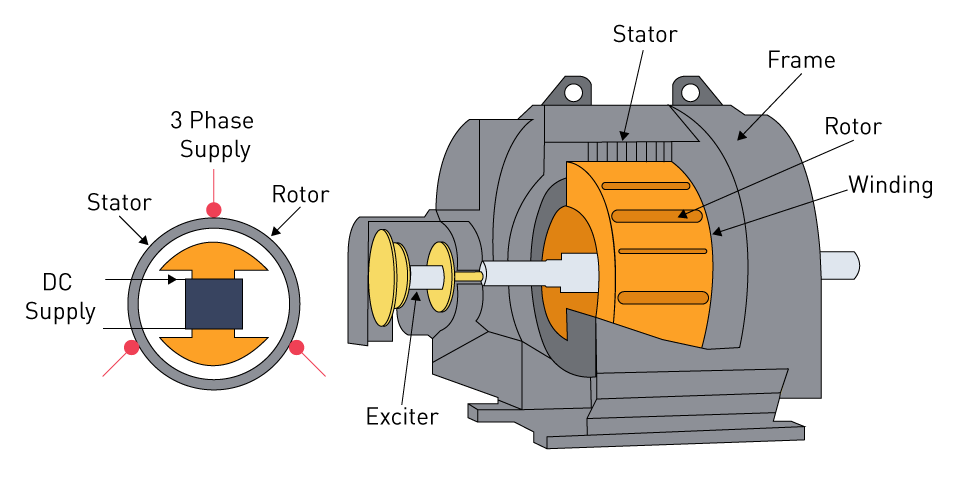
Every table fan starts with energy conversion. When you plug in your fan and flip the switch, electrical current flows into the motor housing where it meets copper coils wrapped around an iron core called the stator.
The process works like this:
• Electric current energizes the copper windings, creating a magnetic field
• This magnetic field interacts with either a rotor or permanent magnets
• The electromagnetic force generates torque, causing the central shaft to spin
• That spinning shaft connects directly to the fan blades, transferring mechanical energy
This electromechanical transformation is what makes airflow possible. The efficiency of this conversion determines how much air your fan can move per watt of electricity, which explains why newer BLDC models feel stronger while using less power.
Blade Aerodynamics: The Science Behind Airflow
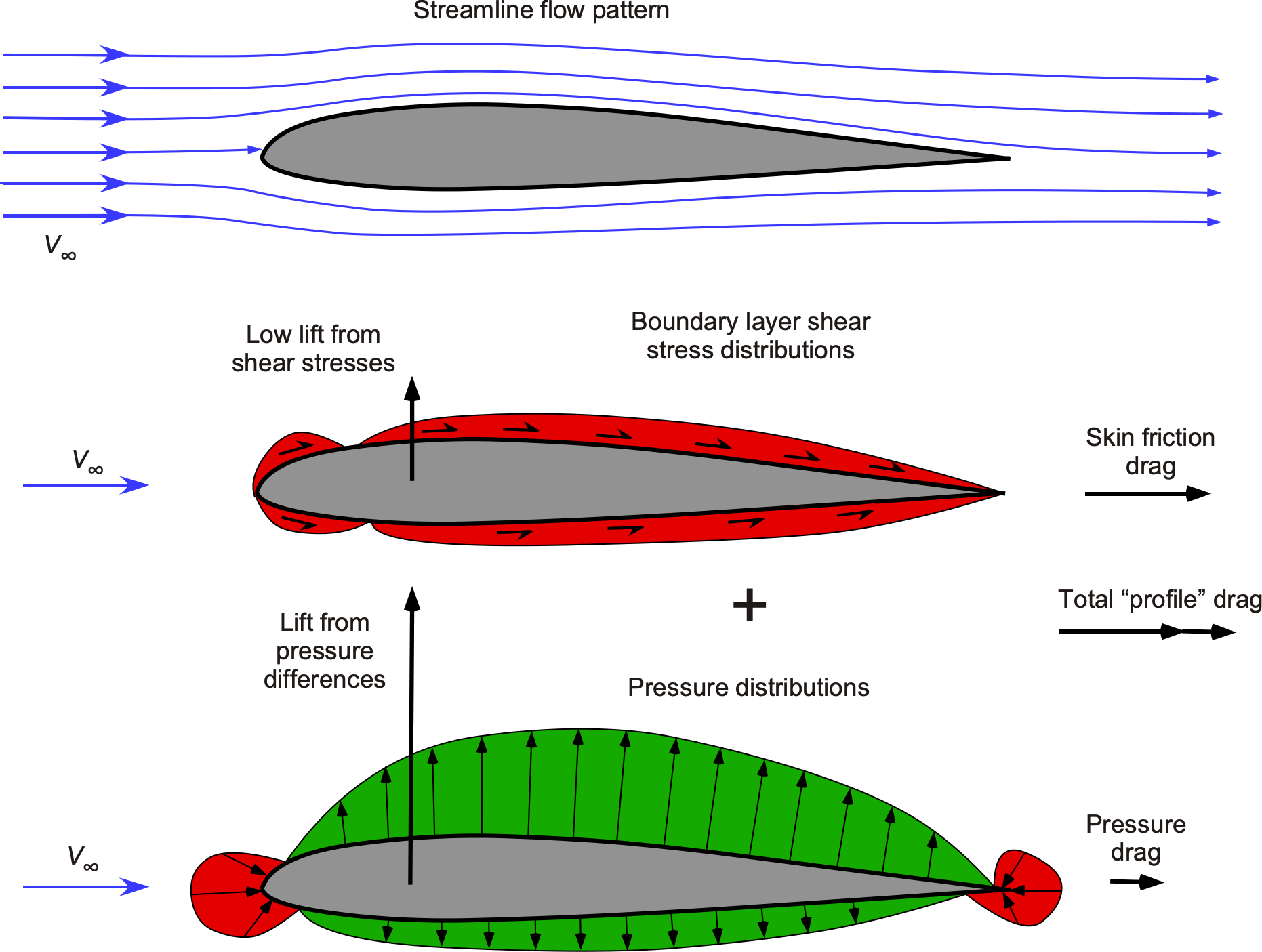
Fan blades aren’t flat pieces of plastic. They’re carefully engineered surfaces angled to push air effectively. The blade pitch, typically between 5° and 20°, determines how much air gets moved with each rotation.
Here’s how the airflow works:
• Angled blades slice through the air, pulling it from behind the fan
• The curved surface pushes air forward, creating a concentrated stream
• Air molecules gain kinetic energy when they collide with moving blades
• This energized air moves away from the fan as the breeze you feel
Most table fans have 3 to 5 blades. Fewer blades often mean higher speed but more turbulence, while more blades produce smoother, quieter airflow but require more torque from the motor.
AC vs BLDC Motors: What’s Inside Your Fan
The motor is the heartbeat of your fan, and you likely have one of three types. Understanding the differences helps you choose the right fan for your needs.
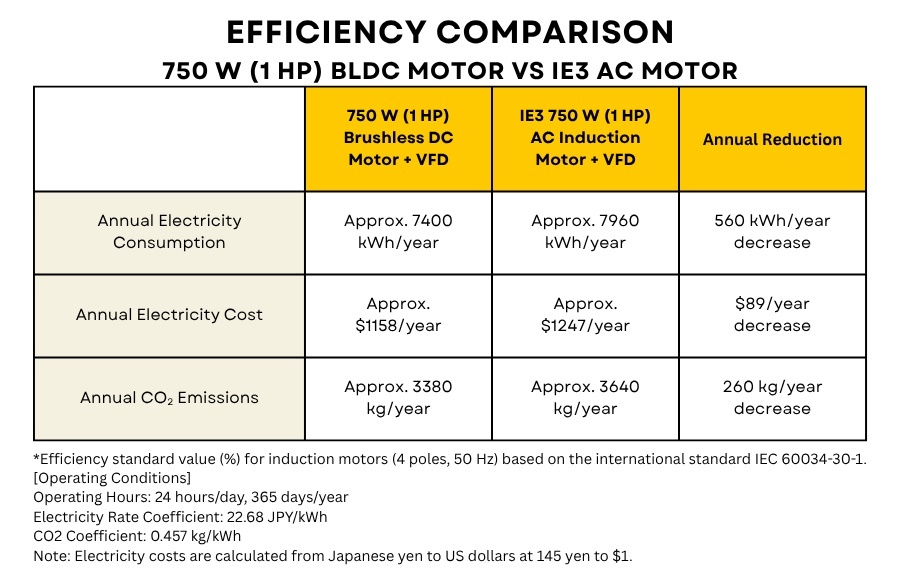
AC Induction Motors are the most common in traditional fans. They run on standard household alternating current and use a squirrel-cage rotor surrounded by stator windings. These motors are inexpensive and durable but less efficient, typically using 40-60 watts. They require a capacitor (usually around 5.5 µF) to generate the starting torque because single-phase AC produces a pulsating magnetic field that can’t start rotation on its own.
Brushless DC (BLDC) Motors represent modern technology. They run on DC power converted from AC internally and use permanent magnets on the rotor with electronic commutation instead of brushes. The advantages are significant: up to 50% more energy efficiency, quieter operation, precise speed control, and longer lifespan. These fans usually include remote controls and multiple speed settings.
Shaded Pole Motors are the simplest option, found in small desk fans. They use a copper ring around part of each stator pole to create a weak rotating field. While inexpensive and reliable, they offer lower torque and efficiency.
The Capacitor’s Role in Starting Your Fan
If your fan hums but won’t start, the capacitor is likely the culprit. Single-phase AC motors face a fundamental problem: the power supply creates a pulsating magnetic field, not a rotating one. Without rotation, there’s zero starting torque.
The capacitor solves this by:
• Connecting in series with an auxiliary winding in the stator
• Causing current in the auxiliary winding to lead the main winding current
• Creating a phase difference that generates a rotating magnetic field
• Providing the initial push needed to start the motor
Many fans keep the capacitor active even after startup to improve running performance and stability. To test a capacitor, set a multimeter to capacitance mode. A good capacitor will initially show a voltage rise (around 9V) and gradually discharge to 0V. No charge or immediate zero reading means replacement is needed.
Speed Control Systems Explained

How your fan changes speed depends on the control system. Older fans use resistive speed control, where a variable resistor limits current to the motor. Less current means slower speed, but this method wastes energy as heat and offers only a few fixed settings.
Modern fans use electronic speed controllers that adjust voltage and frequency delivered to the motor. This enables smooth stepless speed transitions, lower energy loss, quieter operation, and better motor protection.
Mechanical button controls work through a clever mechanism:
• Each button connects to a metal plate with jagged notches
• Pressing a button slides the plate into a locked position
• Color-coded wires send signals to activate specific windings or resistors
• Pressing another button releases the previous lock
The “Off” button typically lacks a locking notch and simply cuts power to all settings.
How Oscillation Moves Air Across the Room
That side-to-side sweeping motion isn’t magic. It’s a combination of a gearbox and a four-bar linkage working together to distribute air over a wide area, often exceeding 100 degrees.
The gearbox contains:
• A worm shaft that rotates with the motor
• A worm gear that meshes with the worm shaft
• A pinion gear that transfers motion to the crank
The gear ratio between worm and worm gear drastically reduces speed. One full turn of the worm might rotate the gear by just one tooth, creating the slow, steady motion needed for smooth oscillation.
A small push-pin on top of the gearbox controls oscillation. When pressed down, spring-loaded ball bearings engage with the worm gear, transferring motion. When pulled up, the bearings retract and the fan stays fixed.
The four-bar linkage then converts this continuous rotation into back-and-forth motion. The fixed short bar stays stationary, the long bar pivots side to side, and the motor housing swings left and right as the crank rotates.
Safety Features Every Fan Has
Your fan includes several important safety components beyond the obvious protective grill.
The wire cage keeps fingers, hair, and objects away from blades spinning at 1,500-3,000 RPM. It’s designed to allow maximum airflow while resisting impact and deformation.
The weighted base keeps the fan upright during operation and oscillation. In oscillating models, it houses the pivot point for the four-bar linkage mechanism.
Thermal overload protection is found in many modern fans. If the motor overheats from blocked airflow, prolonged use, dust buildup, or an electrical fault, the thermal cut-off automatically cuts power until the unit cools. This prevents motor burnout and reduces fire risk.
Troubleshooting Common Fan Problems
When your fan misbehaves, the symptoms usually point to specific causes.
Fan hums but won’t start typically indicates a faulty capacitor or seized rotor. Try spinning the blades by hand. If it starts, the capacitor is weak. Test with a multimeter and replace the capacitor if needed (available for under $10).
Blades spin but no airflow suggests dirty or bent blades, incorrect blade pitch, or the motor running too slowly. Clean the blades thoroughly and ensure they’re installed with the curved edge trailing.
Fan doesn’t oscillate despite the pin being pressed down usually means stripped gearbox gears, common in older plastic gear models. Open the gearbox and inspect for broken teeth.
Squeaking or wobbling noise indicates worn or dry bearings, loose screws, or imbalanced blades. Apply lubricant to the shaft, tighten all screws, and clean dust from blades.
Final Thoughts on How Table Fans Work
Understanding how does a table fan work empowers you to make smarter purchasing and maintenance decisions. The motor converts electrical energy into mechanical motion through electromagnetic principles, while the blade design creates efficient airflow through careful aerodynamic engineering.
Choose a BLDC model for maximum efficiency and quiet operation, or stick with a reliable AC motor for budget-friendly performance. Keep your fan clean, lubricated annually, and inspected for loose connections, and it will deliver refreshing breezes for years. Remember: your table fan doesn’t cool the air itself, but it cools you by accelerating evaporation and turning stagnant heat into comfortable airflow.
Frequently Asked Questions About Table Fans
Does a table fan actually cool the room temperature?
No, table fans do not lower room temperature. They move air to accelerate evaporation of sweat from your skin, making you feel cooler. The fan circulates existing air rather than cooling it like an air conditioner does.
Why does my fan hum but not spin?
This usually indicates a faulty capacitor or a seized rotor. The hum means power is reaching the motor, but the motor lacks the starting torque to begin rotating. Try spinning the blades by hand to confirm.
How much electricity does a table fan use?
Traditional AC fans use 40-60 watts, while modern BLDC fans use 15-30 watts. This makes fans far more energy-efficient than air conditioners, which can use hundreds or thousands of watts.
Can I run my fan 24/7?
Yes, fans are designed for continuous operation. However, modern fans have thermal overload protection that will shut them off if they overheat. For safety, ensure the motor has proper airflow and clean dust regularly.
What is the difference between AC and DC table fans?
AC fans run directly on household alternating current and use induction motors. DC fans convert AC to DC internally and use brushless motors, offering better efficiency, quieter operation, and more precise speed control.