How Long Do Mini Fan Batteries Last?
If you have ever been stuck in a hot commute, outdoor event, or long work shift relying on a mini fan, you have probably asked the question: how long does a mini fan battery last? The answer ranges dramatically, from just over one hour to more than 20 hours, depending on battery capacity, motor type, speed setting, and real-world conditions. Manufacturers often advertise impressive runtimes based on the lowest speed setting in ideal lab environments, not the speeds you actually need for effective cooling. In practice, you may get only about half the advertised runtime when running the fan at useful cooling levels.
This guide breaks down exactly what to expect from different battery capacities, explains why speed settings make such a massive difference, and provides practical calculation methods so you can choose a fan that actually lasts as long as you need it to.
Battery Capacity vs. Real-World Runtime

Battery capacity measured in milliampere-hours (mAh) is the starting point for estimating runtime, but higher mAh does not always mean longer cooling. Efficiency and how you use the fan matter just as much as the raw battery size.
1,000–2,000mAh: Short-Term Cooling Only
Fans in this range are ultra-compact and lightweight, designed for emergency use or brief outings.
- Low speed delivers 4 to 10 hours (1,000mAh) or 8 to 20 hours (2,000mAh)
- High speed drops to under 2 hours (1,000mAh) or 1.6 to 3.2 hours (2,000mAh)
- Best for quick commutes, short walks, or backup cooling
- Reality check: at high speed, these fans may last less than 90 minutes, barely enough for a subway ride or lunch break
These models often use brushed motors and Micro-USB charging, which means slower recharge times and less efficiency. While convenient, they are not built for sustained use.
3,000–4,000mAh: Half-Day Performance
This is the sweet spot for most daily users seeking reliable cooling over 4 to 8 hours.
- Low speed delivers 12 to 18.5 hours (Xiaomi 4,000mAh model tested at 18 hours 33 minutes)
- High speed at 35°C drops to under 4 hours
- Best for workdays, outdoor events, theme parks
The Xiaomi Rechargeable Mini Fan with 4,000mAh delivers up to 18.5 hours on low, but real-world use at higher speeds, especially in hot weather, cuts that significantly. Always check whether the advertised runtime was tested at low speed and room temperature. If so, expect about 50% of that time when the fan is actually cooling you.
5,000mAh+: All-Day Endurance Potential
Top-tier handheld fans with 5,000mAh batteries offer the longest runtimes, especially with efficient brushless motors.
- Low speed delivers 15 to 26 hours (JisuLife Pro 1S claims 15 hours, calculated up to 26 hours)
- High speed delivers 4 to 10 hours
- Best for travel, long shifts, festivals with no charging access
Even with large batteries, max speed drains power fast. The JisuLife Pro 1S with its 15,000 RPM motor uses significant power at full blast, meaning that 15-hour claim applies only to lower settings.
8,000mAh+ (Desk/Clip-On): True All-Day Use
For stationary use, larger desk or clip-on fans can house 8,000mAh or higher batteries.
- Low speed delivers 24+ hours possible
- High speed delivers 6 to 10 hours
- Best for office desks, camping, car rides
These models trade portability for endurance, ideal when you cannot recharge during the day.
Speed Settings Drastically Change Runtime
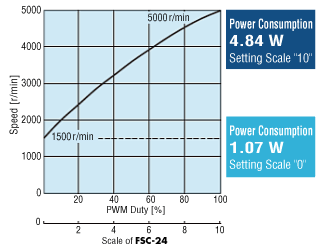
The single biggest factor in battery life is how fast you run the fan. Power draw increases exponentially with speed, not linearly.
Low Speed: 0.3–1.0 Watts
- Battery use is minimal
- Cooling provides gentle breeze, good for mild heat or indoor use
- Runtime example: a 5,000mAh fan (18.5Wh) at 0.6W can last approximately 26 hours
But most users find low speed underwhelming when it is hot. That is why advertised runtimes can be misleading.
Medium Speed: 1.0–3.0 Watts
- Battery use is moderate
- Cooling is effective for most conditions
- Runtime example: same 5,000mAh fan at 2W lasts approximately 8 hours
This is the realistic sweet spot for comfort and battery balance.
High Speed: 2.0–6.0+ Watts
- Battery use is high
- Cooling provides strong airflow, ideal for hot days or physical activity
- Runtime example: at 3W, 5,000mAh fan lasts approximately 5 hours
Max speed on powerful fans can spike to 6W or more, cutting runtime to under 3 hours, even with a 5,000mAh battery.
The 50% Rule: Advertised vs. Real Runtime
Manufacturer claims are often half the story. A fan advertised for 8 hours likely means on Level 1 at 25°C. At a speed that actually cools you on a 35°C day, expect only 3 to 4 hours.
Pro tip: when comparing fans, halve the advertised runtime to estimate real-world performance at useful speeds.
How to Calculate Mini Fan Battery Life

You can estimate runtime yourself using a simple formula. No guesswork needed.
Step 1: Convert mAh to Watt-Hours (Wh)
Most mini fans use 3.7V lithium-ion cells.
Wh = (mAh ÷ 1000) × 3.7V
- 2,000mAh equals (2000 ÷ 1000) × 3.7, which equals 7.4Wh
- 5,000mAh equals (5000 ÷ 1000) × 3.7, which equals 18.5Wh
Some fans powered by USB (like power banks) use 5V, so adjust accordingly.
Step 2: Estimate Power Draw (Watts)
Check specs or use average draws. Low is 0.6W, medium is 2W, and high is 3 to 4W.
Step 3: Apply Efficiency Loss (85%)
Battery circuits, voltage regulation, and heat reduce usable energy.
Runtime (hours) = (Wh ÷ Watts) × 0.85
Real Calculation Examples
Example 1: 2,000mAh fan on high (3W) yields 7.4Wh ÷ 3W = 2.47 × 0.85, which equals approximately 2.1 hours.
Example 2: 5,000mAh fan on low (0.6W) yields 18.5Wh ÷ 0.6W = 30.8 × 0.85, which equals approximately 26 hours.
Example 3: 3,000mAh power bank driving 3.5W fan yields 15Wh (at 5V) ÷ 3.5W = 4.29 hours, which equals real-world approximately 3.5 to 4 hours.
These formulas help cut through marketing claims and predict actual performance.
Brushless vs. Brushed Motors: Efficiency Matters
.png?width=1024&height=768&name=Brushed%20vs%20brushless%20motors%20comparison%20chart%20(Canva).png)
Two fans with the same battery can have wildly different runtimes, thanks to the motor type.
Brushless DC (BLDC) Motors
- Efficiency reaches 85 to 90%
- Lifespan exceeds 10,000 hours
- Noise is lower
- Heat generation is minimal
- Battery impact means longer runtime and cooler operation
High-end models like JisuLife Pro 1S and Xiaomi use brushless motors. They deliver more airflow per watt, making better use of battery capacity.
Brushed Motors
- Efficiency reaches 60 to 70%
- Lifespan reaches 1,000 to 3,000 hours
- Noise is higher
- Heat generation is more waste
- Battery impact means shorter runtime and faster degradation
Common in budget fans, brushed motors draw more power for the same airflow, draining batteries faster.
Bottom line: always check for brushless motor in specs. It is one of the best predictors of long battery life and durability.
Environmental and Design Factors That Drain Power
Even with a large battery and efficient motor, external and design factors can shorten runtime.
Temperature Effects
Cold below 10°C causes battery capacity to drop temporarily, with runtime falling 20 to 30%. Heat above 40°C accelerates battery aging and increases internal resistance. A fan that lasts 5 hours at 25°C may only last 3.5 hours at 35°C.
Oscillation and Extra Features
90° oscillation adds mechanical load and consumes extra power, reducing runtime by 10 to 15%. Aroma diffusers and LED lights are minor but constant drains. Vibration or noise indicates inefficiency, meaning energy lost as sound or heat rather than airflow.
Blade Design and Aerodynamics
Well-designed blades (like Xiaomis 7-blade nature-inspired design) move more air per rotation and require less power. Poorly shaped blades waste energy.
Fast Charging: A Game-Changer for Daily Use
Battery size is not everything. How fast you can recharge matters just as much.
USB-C Fast Charging (18W+)
- 5,000mAh fan charges in approximately 1.5 hours
- Enables mid-day top-ups where 30 minutes equals 2 to 3 hours of runtime
- Found in premium models like JisuLife Pro 1S and newer Xiaomi
Micro-USB (5V/1A–2A)
- Charges 5,000mAh in 4 to 6 hours
- Impractical for daily users who need a quick recharge
- Common in older or budget models
USB Power Delivery (PD)
Only beneficial if the fan supports PD negotiation. A USB-C port alone does not guarantee fast charging. Verify input specs.
Strategic tip: if you can recharge during the day, a 4,000 to 5,000mAh fan with fast charging outperforms a larger, slower-charging model.
Best Fan for Your Use Case
:max_bytes(150000):strip_icc()/tal-jisulife-handheld-fan-life7-jackie-cucco-17-25c53b9b94014ecc827f1c69c4f81fad.jpeg)
Match the fan to your needs. Do not overpay for capacity you will not use.
Short Use (Under 2 Hours)
- Capacity of 2,000mAh is sufficient
- Brushed motor is acceptable
- Micro-USB charging is acceptable
- Ideal for commute and quick errands
- Avoid overspending: no need for 5,000mAh or USB-C
Moderate Use (4–8 Hours)
- Capacity of 4,000 to 5,000mAh is needed
- Brushless motor is required
- USB-C preferred
- Ideal for workday, park visit, outdoor event
- Reality check: confirm advertised runtime is not just at low speed
All-Day Use (No Recharge)
- Capacity of 8,000mAh+ (desk) or 5,000mAh+ (handheld) is needed
- High-efficiency brushless motor required
- Design should be stationary or clip-on for larger battery
- Ideal for festivals, travel, camping
- Pro tip: pair with a power bank if no fast charging available
Intermittent Power Access
Priority should be fast charging over max capacity. Ideal fan is 5,000mAh with 18W USB-C. Strategy: 30-minute lunch charge equals 3+ hours runtime, which is better than 8,000mAh with 6-hour recharge time.
Battery Lifespan and Degradation Over Time
Your fan battery will not last forever. All lithium-ion cells degrade.
Cycle Life: 300–500 Full Charges
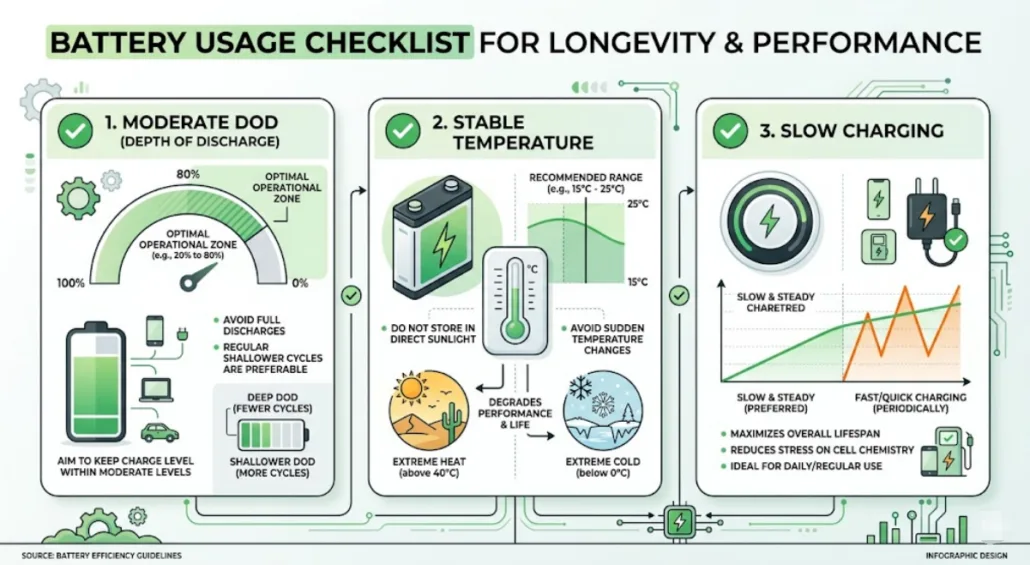
After 300 to 500 cycles, capacity drops to approximately 80%. A 5,000mAh battery becomes 4,000mAh, and runtime shortens noticeably.
Extend Battery Life
Avoid full discharges by recharging at 20 to 30%. Use shallow cycles because frequent top-ups are better than deep drains. Store at 50% if not using for weeks.
When to Replace
Swelling or heat requires immediate replacement. Capacity drop means runtime falls below 50% of original. Non-removable batteries mean the entire unit may need replacing.
Look for UN38.3 and IEC62133 safety certifications when buying or replacing.
Buyer Checklist: Avoid Marketing Hype
Do not fall for vague claims. Here is what to verify before buying.
1. Battery Specs: Demand Details
Cell brand matters. Samsung, LG, and Panasonic are reliable. Capacity must be in mAh, not long-lasting. Voltage should be 3.7V standard. Avoid fans that only say high-capacity with no numbers.
2. Motor Type: Must Be Brushless
BLDC means efficient and long runtime. Brushed means budget and short life. Check product specs or ask the seller.
3. Runtime Context: Ask for Test Conditions
Ask at what speed and temperature the runtime was tested. If the answer is Level 1 at 25°C, halve the number for real use.
4. Charging: USB-C with Fast Charging
Demand 18W+ input. Avoid Micro-USB for daily drivers.
5. Safety and Certifications
Look for UN38.3 (transport safety), IEC62133 (cell safety), and IPX rating if used outdoors.
6. Real-World Reviews
Check for noise levels (dB) and heat output. Users often report shorter runtimes than specs claim.
Key Takeaways for Maximizing Mini Fan Battery Life
- Runtime ranges from 1 to 26 hours depending on speed and capacity
- Advertised runtimes are often half the real usable time. Use the 50% rule
- 5,000mAh with brushless motor is ideal for most users
- Fast charging (USB-C/18W) can beat raw capacity if you can top up
- Low speed uses 0.3 to 1W while high speed uses 3 to 6W. Speed choice is critical
- Brushless motors last longer and save battery
- Cold and heat reduce performance. Plan accordingly
- Battery degrades over time. Expect 80% capacity after 300+ cycles
Choose smart. Prioritize verified specs, brushless motors, and fast charging over flashy claims. With the right fan, you can stay cool all day, no outlet needed.
Frequently Asked Questions About Mini Fan Battery Life
How long does a 5,000mAh mini fan battery last?
A 5,000mAh mini fan typically lasts 15 to 18 hours on low speed, 8 to 10 hours on medium speed, and 4 to 10 hours on high speed. These ranges assume a brushless motor. The actual runtime depends heavily on the speed setting and ambient temperature.
Why do mini fans die faster than the advertised time?
Manufacturers often advertise runtime based on the lowest speed setting (Level 1) in ideal lab conditions at 25°C. Most users run fans at speeds that actually provide cooling, which draws significantly more power. This is why the 50% rule exists: expect roughly half the advertised runtime at useful cooling speeds.
What is the difference between brushed and brushless motors in mini fans?
Brushless motors are 85 to 90% efficient, last 10,000+ hours, generate less heat, and run quieter. Brushed motors are only 60 to 70% efficient, last 1,000 to 3,000 hours, generate more heat, and drain batteries faster. Brushless motors deliver more airflow per watt of battery power.
How can I make my mini fan battery last longer?
Run the fan at lower speeds when possible. Avoid using oscillation continuously. Recharge at 20 to 30% battery level rather than letting it drain completely. Store the fan at 50% charge if not using it for weeks. Use shallow cycles rather than deep discharges for better battery longevity.
What is the 50% rule for mini fan battery life?
The 50% rule is a practical heuristic: take the advertised runtime and cut it in half to estimate performance at a speed level that actually provides effective cooling. If a fan is advertised as lasting 8 hours, expect only 3 to 4 hours at a speed that keeps you cool on a hot day.